Eight gigabytes. That’s still what turns up in some budget laptops sitting on shelves at major Australian retailers right now, and it’s the single biggest reason those machines feel sluggish within a year of getting them home. Meanwhile we’ve seen gaming rigs shipped with 32GB of RAM that a buyer absolutely did not need for what they actually play. Both of those things are true at once, and that’s the whole problem with answering “how much RAM you need” in one sentence.
We get asked this more than almost any other hardware question, usually from someone staring at a laptop listing with three RAM options and a price jump between each one that doesn’t seem to match anything sensible. So let’s sort it by what you actually do with the machine, not by what the box says you should want.
What RAM actually does, in plain English
RAM, short for random access memory, is short-term working space. Think of your storage drive as a filing cabinet and RAM as the desk you’re working at. A bigger desk means more files open at once without having to shuffle things back into the cabinet and pull new ones out, which is what your computer does when it “runs out” of RAM. That shuffling is slow, and it’s why a machine with too little RAM doesn’t crash outright, it just gets stuck in treacle.
Windows 11 and recent versions of macOS will happily use whatever RAM you give them for caching and background tasks. That’s normal. The question isn’t “is it using it all”, it’s “does it ever have to go begging storage for more because there’s nothing left.”
8GB is no longer good enough, full stop
We’ll say the quiet part loudly: 8GB in a new Windows machine in 2026 is a false economy, even for someone who says they “just browse and do emails.” Chrome alone with a dozen tabs open, plus Teams or Zoom running in the background, plus Windows itself, will chew through 8GB without you touching a single creative app. We’ve watched this happen on a relative’s machine more times than we’d like, the fan spinning up for no obvious reason while nothing feels like it’s actually doing much.
If you’re looking at a budget laptop and the only way to afford it is dropping to 8GB, our honest advice is to spend a little more or wait for a sale. We’ve gone through this exact trade-off in our best budget laptops in Australia 2026 guide, and RAM is one of the few places where cutting corners actually costs you more in frustration than it saves in dollars.
16GB is the sensible middle, and probably where most people should land
For general use, which these days means web browsing with far too many tabs, streaming, video calls, light photo editing and most office work, 16GB is comfortably the sweet spot. It gives Windows room to breathe, lets you keep a browser, a document and a background call open without things getting sluggish, and it’s increasingly the starting point rather than the upgrade option on mid-range laptops.
This is also roughly where we’d point anyone weighing up a desktop vs laptop for working from home decision. Whichever form factor you choose, 16GB is the number that stops you thinking about RAM again for the life of the machine, which for most people is the entire point of buying one.
Gaming is where the real argument starts
Here’s our mildly contrarian bit, and we’ll argue it properly rather than just dropping it and running. The gaming community has drifted toward treating 32GB as the “serious gamer” baseline, and we reckon that’s mostly marketing momentum rather than something borne out by what actually happens on screen.
For the overwhelming majority of current games at 1080p or 1440p, 16GB of system RAM is still enough to hit a stable frame rate, provided your graphics card and processor aren’t the bottleneck. The games that genuinely benefit from 32GB tend to be the ones running alongside heavy background tasks: streaming to Twitch while playing, running Discord with a dozen overlays, recording footage at the same time, or juggling a browser with forty tabs because you’re also trying to look up a boss strategy. That’s a real use case for plenty of people, but it’s not “gaming” in the pure sense, it’s gaming plus a part-time production studio running in the background.
If you’re the sort of player who fires up a game, plays it, and closes it, you’ll struggle to find a frame rate difference between 16GB and 32GB in most titles. We’d rather see that extra $80 to $150 go toward a better graphics card or a faster solid state drive, because that’s where the frame rate and loading time gains actually live. We’ve laid out exactly that kind of trade-off across price brackets in our best gaming laptops in Australia 2026 roundup, and it’s a point we keep coming back to because the pattern repeats at every price point.
Where 32GB does earn its keep is in open-world games with heavy texture streaming and in anything built on recent versions of Unreal Engine, where memory use has crept up noticeably. If you’re building specifically around one of those titles, go for it. Just don’t let a spec sheet talk you into paying for headroom you’ll never actually use.
Creative work and multitasking change the maths completely
If you edit video, work across large Photoshop files, run virtual machines, or do serious spreadsheet work with enormous datasets, the calculation above doesn’t apply to you at all. Video editing software routinely wants 32GB as a comfortable minimum once you’re working with 4K footage, and professionals doing colour grading or 3D rendering regularly run 64GB or more.
The tell here isn’t the software’s minimum spec, which is usually written to let the programme limp along. It’s what happens when you’ve got the editing timeline open, a browser full of reference tabs, and an export running in the background. That’s when 16GB folds and 32GB starts to look like the responsible choice rather than the greedy one.
Upgradeable versus soldered RAM, and why it matters more than the number
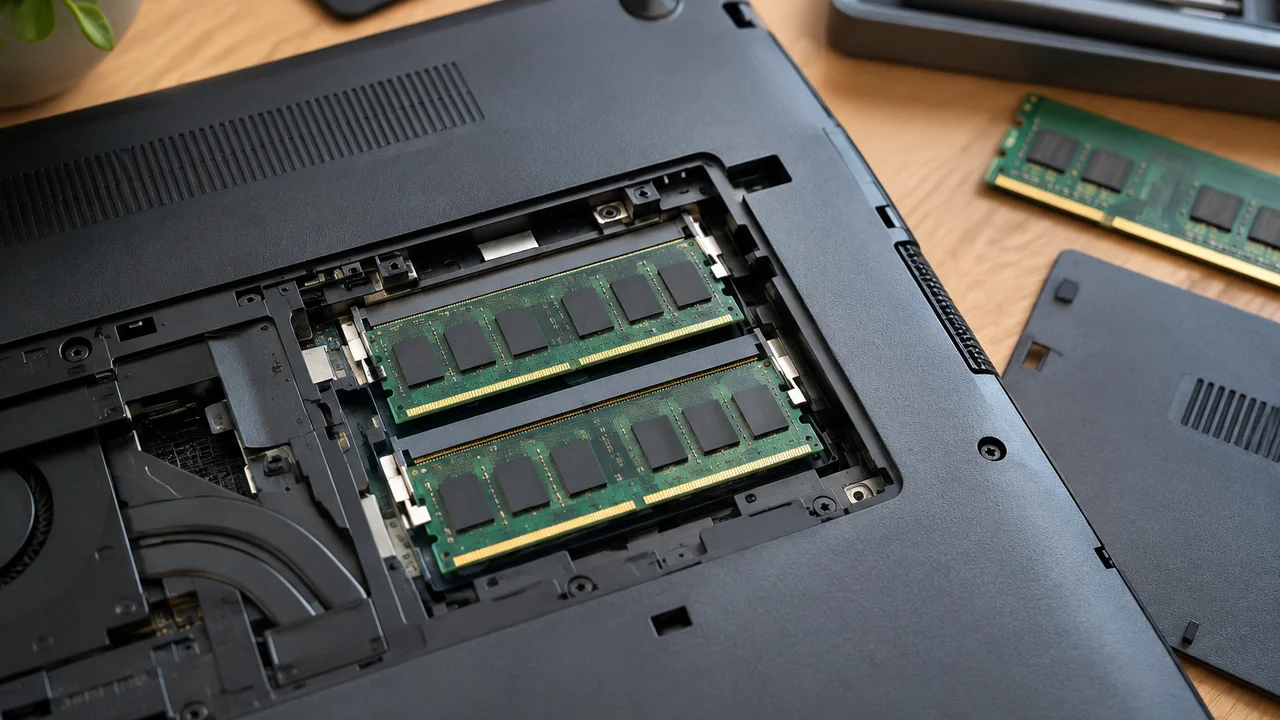
This is the bit that actually costs Australians money long-term, and it gets far less attention than the GB figure on the box. A growing number of laptops, including some from Apple and increasingly from Windows manufacturers chasing thinner designs, now solder RAM directly to the motherboard. That means whatever you buy on day one is what you’ve got for the life of the machine. No upgrade path, no “I’ll add more RAM later when prices drop.”
If a laptop has soldered memory, we’d always suggest buying one notch above what feels comfortable right now, because you’re buying for the next four or five years, not just this afternoon. If it still takes standard SO-DIMM modules, you’ve got more flexibility, and starting with 16GB and upgrading down the track if you genuinely need it is a perfectly reasonable way to spread the cost. Worth checking before you buy, not after. The official spec pages from manufacturers like Intel’s support documentation will usually confirm whether a given chipset and chassis combination even allows user-upgradeable memory, which is worth five minutes of reading before you commit.
What it actually costs in Australia right now
RAM pricing moves around with global supply more than most components, so treat this as a general shape rather than gospel. At the time of writing, going from 16GB to 32GB on a pre-built desktop or gaming laptop typically adds somewhere in the vicinity of $80 to $200 depending on the brand and the memory speed involved. On laptops where the manufacturer controls the upgrade path, that jump can be steeper again, sometimes uncomfortably so, because you’re paying for a factory installation rather than buying a stick of memory yourself.
Building your own desktop is the one scenario where RAM stays genuinely cheap to add later. A spare set of slots and twenty minutes with a screwdriver is a far better outcome than paying a laptop manufacturer’s upgrade premium, and it’s one of the quieter advantages of going the desktop route that doesn’t get talked about enough next to the usual graphics card comparisons. If you do end up reinstalling or upgrading components yourself, our guide on how to reinstall Windows cleanly without losing files is worth bookmarking before you open the case, since a hardware change is a sensible moment to also tidy up the software side.
Our actual recommendation by use case
For anyone doing general browsing, streaming, office work and the occasional video call, 16GB is the number to aim for and we wouldn’t go lower. For most gamers playing mainstream titles without streaming or heavy multitasking on top, 16GB is also genuinely fine, and we’d rather see your budget flow toward the graphics card. For streamers, content creators and anyone running several demanding apps simultaneously, 32GB earns its price. For serious video editing, 3D work or large-scale data work, 32GB is the floor and 64GB is where plenty of professionals actually sit.
The honest take is that the industry has a habit of pushing round numbers as the “proper” tier, the way phone storage once got treated as too small even when nobody would ever fill it. The Australian Competition and Consumer Commission’s guidance on buying products and services is a good general reminder that advertised specs don’t always map to real-world need, and that applies just as much to a RAM upgrade tier as it does to any other add-on you’re being upsold at the checkout. Match the memory to what you actually do, not to what feels impressive on a spec sheet, and check whether it’s upgradeable before you hand over the money. Get that right and you’ll stop thinking about RAM for years, which, honestly, is the best outcome any of us can hope for from a computer component.
— *Josh Tannenbaum, Gaming Writer, Tech Geek*
Featured image: AI-generated illustration.