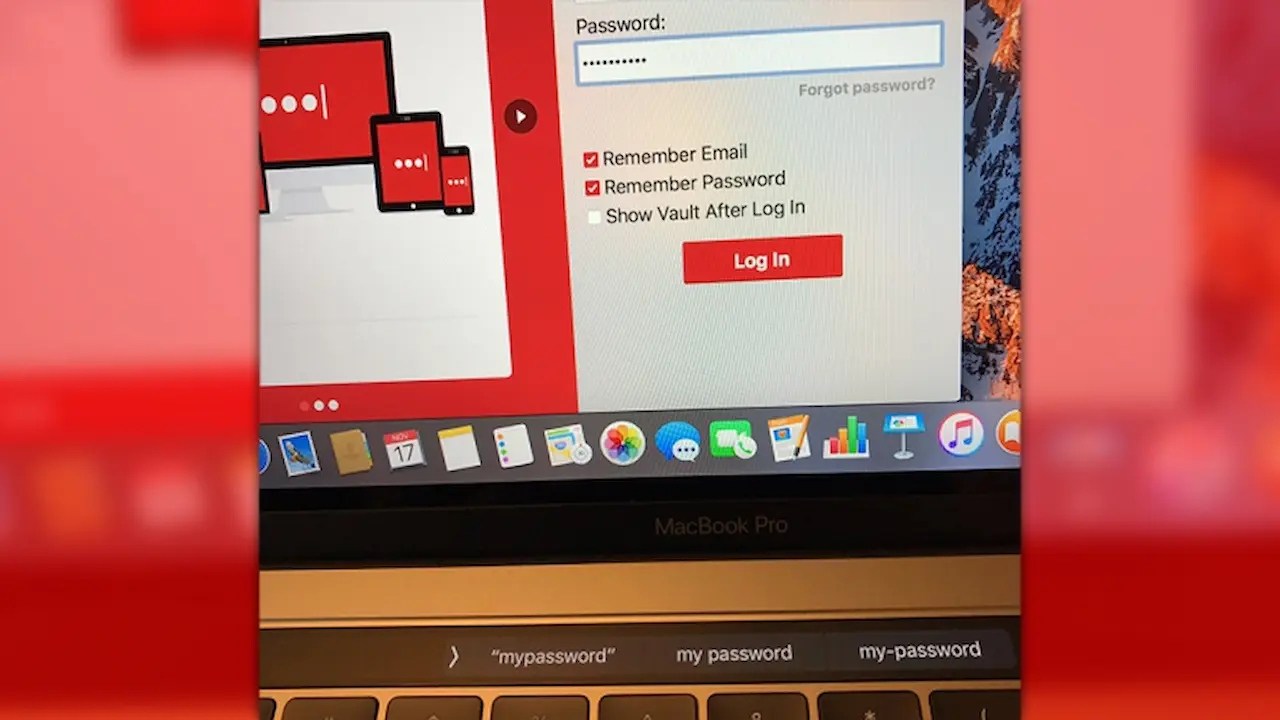
You may want to temporarily stop using the macOS application if you own a MacBook Pro that has the Touch Bar and use LastPass. There is a serious LastPass Bug that can reveal your master password when logging in to the service. LastPass users who depend on the service for their digital security should be concerned, as all passwords in their vault may potentially be exposed. The Touch Bar on MacBook Pros can display sensitive data unintentionally. It is crucial to understand this vulnerability to maintain your privacy and security when using password management software.
The LastPass Bug is causing concern in social media and the tech community. It highlights the importance of checking app versions and settings. Not every day does a password manager that is widely used have a bug that affects the user interface of your device. This problem shows how small software mistakes can have a big impact on personal security. The Touch Bar Passwords of MacBook Pro users who use it may be at greater risk, since predictive text can reveal the Touch Bar Passwords. This incident serves as a warning that digital identity protection is a continuous process and requires constant vigilance.
What is LastPass?
LastPass is an extremely popular password manager that stores and protects your login credentials on a single secure server. It allows users to create strong passwords that are unique for each account. This eliminates the need to memorise multiple passwords. It syncs between devices so you can access your passwords on smartphones, tablets and computers. LastPass is a convenient and safe way to manage multiple online accounts.
LastPass also offers other features, such as secure notes, two-factor authentication, and password sharing. These tools provide additional layers of security, making it more difficult for hackers to gain access to your account even if the password has been compromised. LastPass is popular with both individuals and companies because it simplifies the security process while improving password hygiene. Like any other security software, its effectiveness depends on regular updates as well as strong master passwords.
How does the LastPass bug work?
The bug was first reported by a Twitter user, who explained that the problem stems from the way the LastPass macOS app handles password fields. LastPass hides the password by masking it with a text box. MacOS does not protect the password because it treats the text box as a normal text field.
This poses a serious vulnerability to the Touch Bar. The Touch Bar can display the password in plain text or offer suggestions for spelling. Passwords can be exposed without the user’s knowledge, because this field does not recognise it as a secure input.
Apple MacBook Pros without Touch Bar are still susceptible. Right-clicking the text box in these cases may reveal the plain text password. This is a security threat, even though it does not happen automatically. Users of Touch Bars and those without should take temporary measures until the problem is resolved.
Who is affected by the LastPass Bug?
This LastPass Bug affects only the macOS desktop app at the time this bug was reported. LastPass users who access the service via browser extensions will not be affected, providing a safer option for those in need of immediate access to their vault. This distinction is important because it allows users to continue to use LastPass without disclosing their master password. MacBook Pro users with Touch Bar should not enter passwords in the desktop app until a solution is released.
Risks are the same for anyone using macOS and LastPass in conjunction, whether or not their device has a Touch Bar. Touch Bar users are at the greatest risk of exposing passwords, but non-Touch Bar customers could also unintentionally do so. Users can make better decisions by understanding the extent of this bug. They may decide to temporarily switch to browser extensions or use other secure methods for accessing their account.

How to Protect Yourself from this Bug?
Users can minimise the risk until LastPass fixes this flaw. Avoid logging into the macOS desktop application and instead use the browser extension. Extensions are unaffected by this and offer a safer alternative. If you are using a Touch Bar MacBook Pro, be careful when entering sensitive data. Third, enable two-factor authentication on your LastPass to add another layer of security. Last but not least, make sure you keep your apps up-to-date. LastPass developers will be actively working on a fix for the security issue.
Users should be aware of any suspicious bbehaviouror prompts that are unusual when using LastPass. This is especially true if they enter passwords in the desktop application. These steps will allow users to maintain their account security while they wait for the official fix. It is important to be aware and take proactive measures to prevent accidental password disclosure.
What is LastPass’s response to this issue?
LastPass developers acknowledged the issue publicly on social media. They confirmed that they are reviewing the vulnerability. The company explained the problem was caused by the way macOS handled password fields. The company also said that it would update the application to use the macOS native password field. This should prevent Touch Bar passwords from being exposed. LastPass’s response shows it is working hard to restore security.
LastPass shows that the safety of its users is important by promising a solution. It is practical and strong to align the macOS password field with macOS standards. The update may take some time, but the acknowledgement helps to rebuild trust with users. LastPass is used by many people to store sensitive data, so the platform must maintain its reputation.
Users are advised not to use the macOS app in the interim until the update has been released. It is important to be cautious, as even the most trusted platforms may have vulnerabilities. The proactive approach of the company highlights the importance of regular software updates and quick responses to security concerns. The situation shows how important it is that password managers remain transparent and responsive to users’ concerns.

What does this mean to MacBook Pro users?
This issue is a good reminder to MacBook Pro users about how software interacts and works with hardware features such as the Touch Bar. Apple’s Touch Bar offers quick access to keyboard suggestions, shortcuts and controls. This convenience can become a security threat when apps don’t use the proper password fields. Touch Bars are designed to increase productivity, but they can unintentionally expose sensitive information if used with non-secure input fields.
Users who depend on Touch Bar features to auto-fill passwords or perform quick actions need to be extra cautious and keep up with software patches. This situation emphasises the importance of balancing convenience and security when dealing with sensitive data, particularly on modern hardware. MacBook Pro users may also want to use the browser extension or web-based password manager until the problem is resolved. Knowing how apps interact and work with hardware is crucial to protecting personal data and maintaining your digital security.
This serves as a good reminder that even applications widely trusted, like LastPass, are not immune to bugs. By staying informed, updating your software, and changing your usage habits, you can reduce the risk of a security breach.
Conclusion
LastPass Bug that affects MacBook Pro Touch Bar Passwords is a serious concern, but can be managed with caution. Users should temporarily avoid using the macOS desktop application and instead use browser-based alternatives. LastPass’s response to the flaw, which highlights a possible risk, demonstrates its commitment to the security of users. Users can continue to use LastPass in a safe manner by staying informed, taking precautions and installing updates when they become available. This is a timely reminder for MacBook Pro users that even advanced features, such as the Touch Bar, need to be carefully monitored to maintain privacy and security.